Cursor / MCP configuration field notes
Cursor MCP: configure, scope, inspect, and debug a server
.cursor/mcp.json and personal servers in ~/.cursor/mcp.json. Use command plus args for a local stdio server, or url for a remote HTTP or SSE server. Then inspect the server in Customize > MCPs, or run agent mcp list and agent mcp list-tools IDENTIFIER. If project and global files use the same server name, the project definition takes priority.Our Windows lab completed a real MCP initialize, tool discovery, and tool call against a purpose-built stdio fixture. It also checked four configuration shapes and simulated the documented project-over-global name collision. Cursor itself did not load the fixture because neither cursor nor agent was available on this machine's PATH. That boundary is deliberate: the protocol passed; Cursor runtime discovery remains Untested.
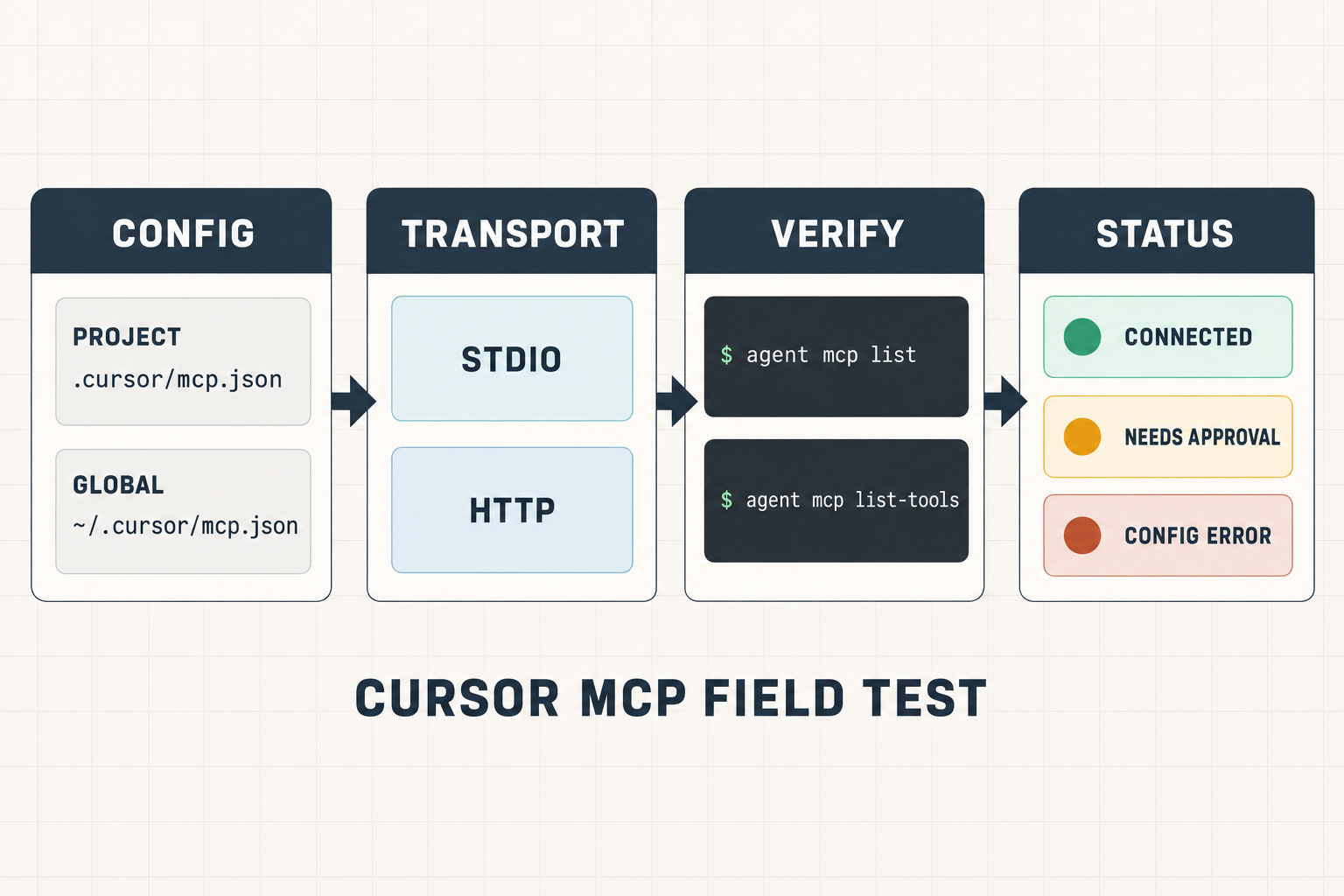
Choose project or global scope before writing JSON
| Location | Audience | Use it when | Name collision |
|---|---|---|---|
.cursor/mcp.json | One project and its collaborators | The repository should carry the reviewed server definition | Project definition wins over a global definition with the same name |
~/.cursor/mcp.json | One user across projects | The server is a personal utility, not repository policy | Used only when the project does not override that name |
| Customize > MCPs | Interactive editor management | You want to browse, enable, disable, or authenticate a server | The UI shows the resolved server and tool state |
| Extension API | Extension-managed runtime registration | An extension must register or remove a server without editing JSON | The extension owns its registration lifecycle |
${env:NAME}, ${userHome}, and ${workspaceFolder}. Reference an environment variable instead of committing a token.Use one server shape at a time
Local stdio server
{
  "mcpServers": {
    "local-tools": {
      "type": "stdio",
      "command": "node",
      "args": ["${workspaceFolder}/tools/server.mjs"],
      "envFile": "${workspaceFolder}/.env"
    }
  }
}
Remote server
{
  "mcpServers": {
    "remote-tools": {
      "url": "https://mcp.example.com/mcp",
      "headers": {
        "Authorization": "Bearer ${env:MCP_TOKEN}"
      }
    }
  }
}| Field | Stdio | Remote | Failure to avoid |
|---|---|---|---|
command | Required | Not used | A stdio entry with no command cannot start |
args | Optional array | Not used | Keep each argument as a separate array item |
url | Not used | Required | Do not combine a remote URL and local command in one definition |
envFile | Supported | Not supported | Remote servers must use environment interpolation instead |
headers | Not used for process startup | Optional | Do not paste a long-lived token directly into committed JSON |
Verify discovery before asking the agent to use a tool
agent mcp list
agent mcp list-tools IDENTIFIER
agent mcp enable IDENTIFIER
agent mcp disable IDENTIFIER- Confirm the server appears and note whether its source is project or global.
- Confirm the transport shown is the one you intended.
- List tools and read names, descriptions, and argument schemas before enabling automatic use.
- For editor-side failures, open the Output panel and select MCP Logs.
- Call one low-risk tool with controlled input before giving the server broader access.
Cursor asks for approval before MCP tool use by default. Approval policy and server discovery are separate: a server can be configured and discoverable without every tool being allowed to run automatically.
Local field test: what passed, failed, and stayed untested
The lab used a 48-line Node stdio fixture with one tool named echo_probe. A separate client sent initialize, tools/list, and tools/call. The same run checked documented config constraints without touching ~/.cursor or a real project file.
| Case | Observed result | What it proves | Boundary |
|---|---|---|---|
| MCP initialize | specmatter-cursor-echo 1.0.0 | The fixture completed the protocol handshake | Direct client-to-server test, not Cursor |
| Tool discovery | echo_probe | The server returned a tool schema | Cursor's tool panel was not observed |
| Controlled tool call | cursor-echo:scope-check | The tool returned the expected deterministic text | No model selected or called the tool |
| Project stdio shape | Valid | Required command and stdio-only envFile rules passed the lab validator | Validator follows the cited docs; it is not Cursor's parser |
| Global HTTP shape | Valid | URL plus environment-interpolated header passed | No network request or OAuth flow ran |
| Stdio without command | Rejected | The lab caught a missing startup command | No Cursor diagnostic was captured |
| Remote URL with envFile | Rejected | The lab enforced the documented stdio-only envFile rule | No Cursor diagnostic was captured |
| Cursor runtime load | Untested | where cursor and where agent both exited 1 | No executable was available on PATH |
Download the observation matrix (CSV) Download the minimal stdio fixture
Failure matrix
| Symptom | Likely checkpoint | Next evidence to collect |
|---|---|---|
| Server does not appear | Wrong file location or invalid JSON | Confirm exact project root, file name, JSON parse, and MCP Logs |
| Server appears but is disconnected | Process or endpoint startup | Check executable path, argument array, URL, and server stderr |
| Global server changes inside one project | Project name collision | Search both files for the same key; project takes priority |
| Token is empty after restart | Environment inheritance | Confirm Cursor inherited the variable, then restart after shell-profile changes |
| Remote server ignores envFile | Unsupported field | Move the secret to an environment variable and interpolate it in headers |
| Tool exists but does not run | Approval or enablement | Inspect tool state, arguments, approval mode, and MCP Logs |
FAQ
Should Cursor MCP config be committed?
Commit a reviewed project .cursor/mcp.json when teammates need the same server definition. Keep personal utilities in the global file. Never commit a credential.
Why does the project definition override the global one?
Cursor merges both files and gives the project-level definition priority when the same server name appears in both.
Can a remote server use envFile?
No. Cursor documents envFile for stdio servers only. Remote definitions should reference environment variables in fields such as headers.
Did this test show Cursor calling the tool?
No. The MCP fixture and direct client passed, but no Cursor executable was available on PATH. Cursor loading and model-driven tool use remain untested.