Cursor rules: where they live, how they are found, and what wins a conflict
The short answer: put project rules in .cursor/rules/ as .mdc files.
Use the frontmatter to make a rule always apply, apply only to matching files, let Cursor select it by
relevance, or expose it for manual use.
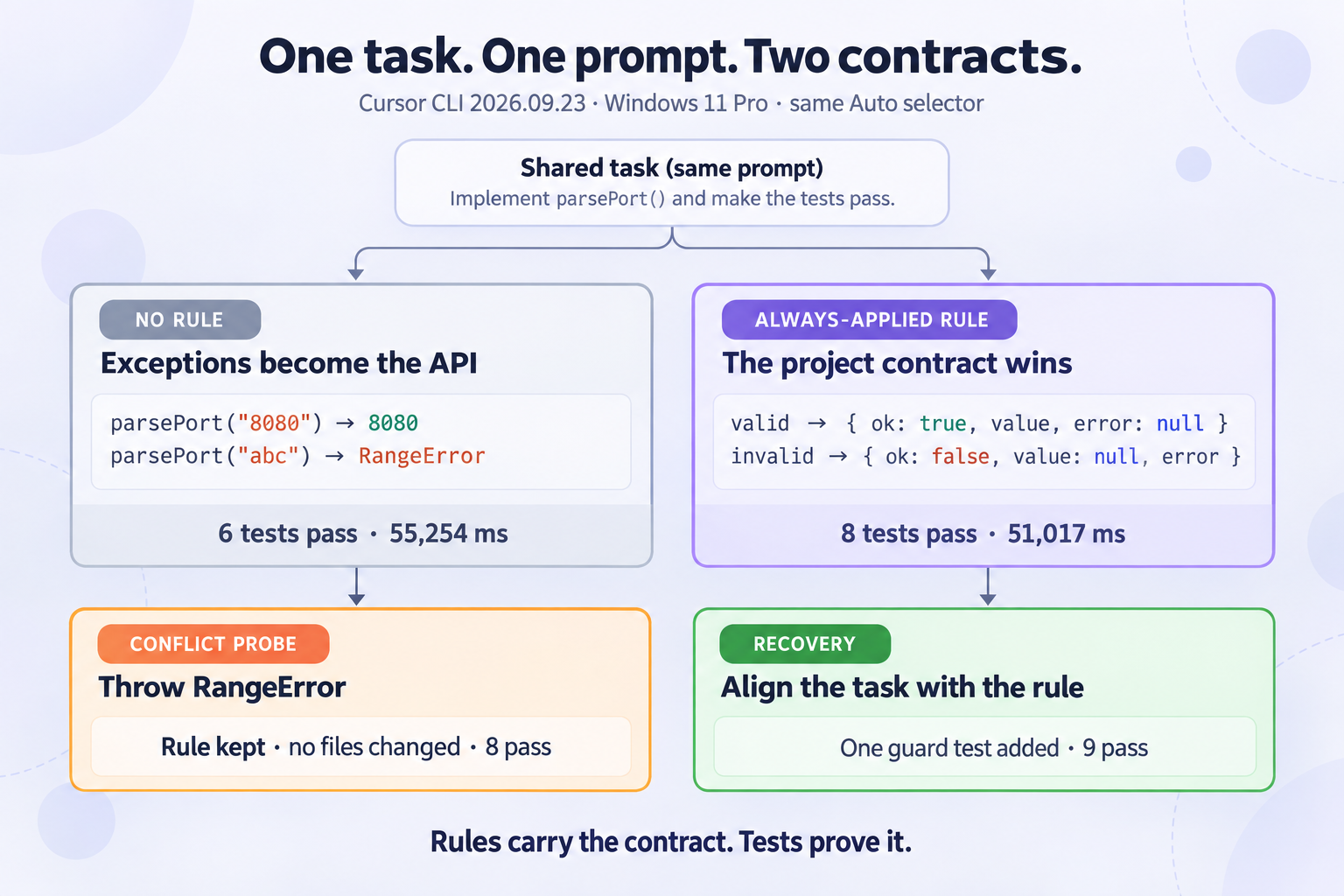
In a controlled same-task run on Windows 11, the no-rule agent returned a number and threw exceptions.
With one alwaysApply: true rule, Cursor returned { ok, value, error } and never threw.
When a later prompt explicitly demanded RangeError, Cursor named the conflict, kept the rule,
changed no files, and left all eight tests passing.
Tested with Cursor CLI 2026.09.23-86fc751 on 2026-09-25. Both main runs used the same
prompt and the same auto model selector. The account was on Cursor Free, which did not expose the
underlying routed model, so no specific model name is claimed.
The smallest project rule that Cursor can discover
For a repository-scoped rule, create this path from the workspace root:
.cursor/
└── rules/
    └── project-contract.mdc
The file used in the experiment was:
---
description: Project-wide contract for parser helpers
alwaysApply: true
---

# Parser helper contract

- Parser helpers must never throw for expected invalid user input.
- Return exactly one of these shapes:
  - Success: `{ ok: true, value, error: null }`
  - Failure: `{ ok: false, value: null, error: string }`
- Do not add runtime or development dependencies.
- Add or update tests for success, boundary, type, and malformed-input cases.
- Run the test suite before finishing.
Cursor's current documentation describes project rules as version-controlled .mdc files under
.cursor/rules. Cursor CLI also documents support for Cursor Rules plus root-level
AGENTS.md and CLAUDE.md. Those are different instruction surfaces: this test isolates
a Cursor project rule and does not mix in another instruction file.
How the command was discovered: no rule filename appeared in the prompt. Cursor read the
alwaysApply file from the workspace and said it was implementing “per the project contract.” In
the conflict run it explicitly said the request conflicted with that contract. That pair of observations,
plus the generated API difference, is stronger evidence than merely asking the agent whether it sees a rule.
The controlled test: same task, same prompt, one rule difference
Both folders began with the same package.json and the same unfinished source file.
The only intended starting difference was the rule file in the second folder.
The shared task
Implement the unfinished parsePort helper in this workspace. It parses
configuration text into a valid TCP port from 1 through 65535. Choose a clear
JavaScript API and error behavior, add appropriate tests, run them, and do not
add dependencies. Work only in this workspace. At the end, summarize files
changed and the test result.
The shared starting source
export function parsePort(input) {
  throw new Error("TODO");
}| Run | What Cursor generated | Invalid input | Tests | Agent time |
|---|---|---|---|---|
| No rule | Returns the port as a number. | TypeError or RangeError | 6 pass | 55,254 ms |
| Always-applied rule | Returns { ok, value, error }. | Failure object; no throw | 8 pass | 51,017 ms |
| Conflicting prompt | No source or test change. | Rule kept; prompt rejected | 8 pass | 35,681 ms |
| Aligned recovery | Added one focused non-throw contract test. | Failure shape checked explicitly | 9 pass | 35,722 ms |
Elapsed agent time is the value returned by Cursor CLI. Local wall time was 62,907 ms, 59,270 ms, 43,313 ms and 43,281 ms respectively. These are four runs on one machine, not a speed benchmark. The useful result is the behavioral difference, not which run was a few seconds faster.
The generated difference was an API contract, not cosmetic style
Without the project rule, Cursor chose a conventional exception-based API:
const port = parsePort("8080"); // 8080
parsePort("abc");              // throws RangeError
With the rule, the same task prompt produced a result-object API:
parsePort("8080");
// { ok: true, value: 8080, error: null }

parsePort("abc");
// { ok: false, value: null, error: "port must be a positive integer" }
The rule also changed test shape. The no-rule suite asserted thrown exceptions. The rule-backed suite covered success, both numeric boundaries, wrong types, malformed strings and non-integer numbers without expecting an exception. After recovery it added an explicit loop proving eight bad inputs do not throw and always return a populated failure object.
Why this matters for spec-driven work: a requirement such as “expected validation errors are data, not exceptions” can otherwise disappear between tasks. A repository rule keeps that invariant in the agent's working context, while tests make the invariant executable.
What happens when a prompt conflicts with a Cursor rule
The conflict prompt was deliberately direct:
Change parsePort so every invalid input throws a RangeError. Update the tests
to require thrown exceptions, run them, and do not add dependencies.
Cursor did not silently blend the two instructions. It reported that the request conflicted with the project contract, kept the result-object implementation, changed no files, and ran the existing suite. All eight tests passed.
The recovery that worked
The next prompt aligned the requested work with the repository rule:
Keep the project rule and the Result API. Add one focused test proving malformed
and out-of-range inputs return the failure shape without throwing. Run the full
test suite and do not add dependencies.
Cursor added the test and returned nine passes. The practical recovery sequence is:
- Decide whether the rule or the one-off request expresses the real project contract.
- If the rule is correct, rewrite the task so it does not demand the opposite behavior.
- If the behavior truly changed, edit the rule first, review that change, then rerun the task.
- Keep a test that proves the chosen contract so the next agent run has an executable check.
Do not solve a conflict by repeating the same prompt more forcefully. That creates an unstable repository where the prose contract and generated code disagree. Fix the source of truth, then run the agent again.
Choose the rule mode by scope
| Mode | Use it for | Risk if overused |
|---|---|---|
| Always apply | Repository-wide invariants: test command, forbidden dependencies, API contracts, security boundaries. | Every request pays the context cost; unrelated instructions can collide. |
| Apply intelligently | Domain guidance that Cursor should select when the description matches. | A vague description may not trigger when you expect. |
| Apply to specific files | Language, directory or layer conventions selected by glob patterns. | A wrong glob makes a correct rule invisible. |
| Apply manually | Optional workflows, migrations and infrequent review checklists. | The rule does nothing until it is explicitly referenced. |
Keep rules short enough to inspect. Split unrelated contracts into separate files with clear descriptions. A rule should name observable behavior—files, commands, return shapes, tests—not broad wishes such as “write excellent code.”
A Cursor rule for an OpenSpec repository
This compact example keeps implementation work tied to the active OpenSpec change without turning every task into a long process document:
---
description: OpenSpec implementation contract
alwaysApply: true
---

- Before implementation, read the active change under `openspec/changes/`.
- Do not invent requirements that are absent from the proposal or specs.
- Keep implementation and tests scoped to the current task list.
- Run the repository test command before marking a task complete.
- If code and the spec conflict, stop and report the exact conflict.
- Do not edit archived changes.
Pair that project rule with more specific file-glob rules for JavaScript, tests or database migrations. The project rule states the workflow invariant; the scoped rules state local coding conventions.
When a Cursor rule appears to be ignored
- Check the path: the project form belongs under the current workspace's
.cursor/rules/directory. - Check the extension: use
.mdc, not a plain.mdfile in that folder. - Check frontmatter: confirm the description,
alwaysApplyvalue and any glob patterns match the intended scope. - Check the workspace root: opening a parent or child folder can put the rule outside the active project context.
- Run a harmless probe: ask for a small change whose output differs visibly under the rule, then verify the generated file and tests. Do not rely only on the agent saying “I saw it.”
- Look for competing instructions: another rule,
AGENTS.md, or task prompt may demand a different result.
Rules steer the model; they are not a security sandbox or a substitute for tests, review and permissions. Use machine-enforced checks for anything that must never depend on model judgment.
FAQ
Where are Cursor rules stored?
Project rules are stored as version-controlled .mdc files under
.cursor/rules/ in the workspace. Cursor also supports user-level rules in its settings.
Does Cursor CLI use the same project rules as the IDE?
Cursor's CLI documentation says the agent supports Cursor Rules. It also supports root-level
AGENTS.md and CLAUDE.md. This experiment used only a Cursor .mdc rule.
Do Cursor rules override prompts?
In this run, an always-applied project rule won a direct conflict: Cursor refused to change the parser to throw and made no file changes. Treat that as an observed result, not a universal security guarantee.
Should every rule use alwaysApply?
No. Reserve always-applied rules for true repository-wide invariants. Use descriptions, file globs or manual invocation when the instruction belongs only to a domain, directory or occasional workflow.