Claude Code / MCP connection field notes
Claude Code MCP: add, scope, verify, and debug a server
claude mcp add --transport http NAME URL, or add a local process with claude mcp add --transport stdio NAME -- COMMAND ARGS. Choose local, project, or user scope deliberately. Then run claude mcp list and claude mcp get NAME. An Added message proves the configuration was written; only a health status such as Connected proves that Claude Code completed a connection check.On this Windows machine, Claude Code 2.1.283 connected to a purpose-built stdio server in an isolated local scope. The same server placed in a project .mcp.json stayed at Pending approval. A URL entry with no type was skipped with a precise diagnostic. No Claude login, model request, OAuth flow, third-party server, or credential was used.
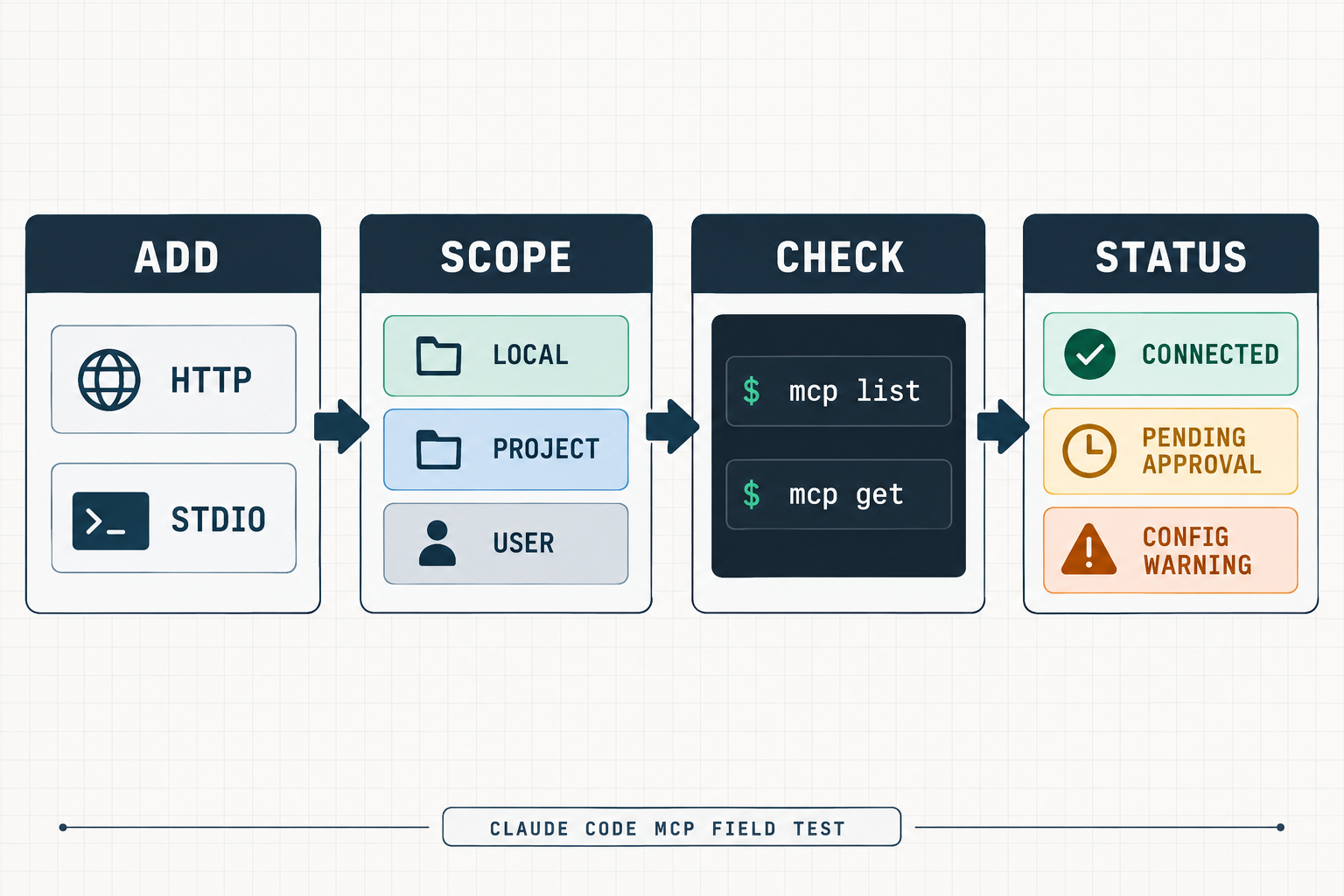
Choose the transport from the server shape
| Server shape | Command | Use it for | Important detail |
|---|---|---|---|
| Remote HTTP | claude mcp add --transport http NAME URL | Cloud services and hosted APIs | HTTP is the recommended remote transport |
| Local stdio | claude mcp add --transport stdio NAME -- COMMAND ARGS | Local binaries, scripts, and tools needing machine access | The double dash keeps server flags out of Claude Code's argument parser |
| Remote SSE | --transport sse | Legacy endpoints that expose only SSE | SSE is deprecated; prefer HTTP when available |
| WebSocket | claude mcp add-json NAME '{"type":"ws",...}' | Persistent bidirectional event streams | Configure it with JSON; the transport flag does not accept ws |
claude mcp add --transport http docs https://mcp.example.com/mcp

claude mcp add --transport stdio local-tools -- \
  node .\server.mjs --mode safe
A URL without a transport type is not a harmless omission. Claude Code treats an entry with no type as stdio, so a bare url is a configuration error rather than an HTTP default.
Scope decides who sees the server
| Scope | Stored in | Audience | Observed or documented behavior |
|---|---|---|---|
| Local | User configuration, keyed to one project | One user in one repository | Private project-specific server; highest precedence of the three scopes |
| Project | .mcp.json at the project root | Repository collaborators | Shareable, but interactive sessions require approval before use |
| User | ~/.claude.json | One user across projects | Good for personal utilities used everywhere |
claude mcp add --scope local   --transport stdio demo -- node server.mjs
claude mcp add --scope project --transport stdio demo -- node server.mjs
claude mcp add --scope user    --transport http  demo https://example.com/mcp
If the same name exists in multiple scopes, Claude Code uses one complete definition rather than merging fields. The documented precedence is local, project, then user, followed by plugin-provided servers and claude.ai connectors.
Isolated Windows test: connected versus pending approval
The fixture was a small Node stdio process written for this test. It answered initialize, ping, tools/list, and tools/call, and exposed one tool named echo_probe. Claude Code ran against a task-only CLAUDE_CONFIG_DIR, so the real user configuration was not changed.
claude mcp add --transport stdio --scope local \
  specmatter-echo -- node .\echo-server.mjs

claude mcp list
claude mcp get specmatter-echo| Case | Exit | Observed status or output | What it proves |
|---|---|---|---|
| Add local stdio server | 0 | Added stdio MCP server specmatter-echo ... to local config | The local configuration was written |
| List local server | 0 | specmatter-echo ... Connected | Claude Code started the fixture and completed its health check |
| Get local server | 0 | Scope Local config, status Connected, type stdio | The resolved scope, command, and status were inspectable |
| Add the same fixture to project scope | 0 | Pending approval (run claude to approve) | A committed project entry is not automatically trusted |
| Get an unknown name | 1 | No MCP server named "missing-server" | A missing name is distinguishable from a failed connection |
Download the MCP observations (CSV) Download the minimal stdio fixture
Failure matrix: read the status before changing the config
| Signal | Meaning | Next check |
|---|---|---|
Connected | The health check reached the server | Inspect the tool count and test only the intended tool |
Pending approval | A project .mcp.json entry has not been approved | Open an interactive session in a trusted workspace and review the server |
Needs authentication | The remote endpoint requires an auth flow | Use claude mcp login NAME only after verifying the endpoint |
Failed to connect | The definition loaded, but the connection failed | Read the HTTP status or transport detail from mcp get |
No MCP server named ... | The requested name did not resolve | Run claude mcp list and check spelling and scope |
url but no type | The remote entry was skipped as invalid | Add "type":"http", "sse", or "ws" |
In the malformed fixture, claude mcp list itself exited 0 while the diagnostic block said the server was skipped. A successful list command therefore does not mean every entry loaded successfully; read the diagnostics below the list.
A repeatable verification sequence
- Verify the server owner, executable, endpoint, and requested credentials before adding anything.
- Choose the narrowest scope that matches the audience. Start with local for an evaluation.
- Run
claude mcp list; do not stop at the earlierAddedmessage. - Run
claude mcp get NAMEto inspect the resolved scope, transport, command or URL, and failure detail. - For project scope, review and approve the server interactively instead of committing an approval shortcut.
- Open
/mcpin an authenticated session to inspect tool count and disable a server without deleting its configuration. - Call one low-risk tool with controlled input before granting broader access.
Servers can expose external content to the model, so prompt injection is part of the threat model. Treat tool descriptions, remote data, and server-returned instructions as untrusted input.
FAQ
Does Added mean the MCP server works?
No. It means the configuration was written. Run claude mcp list or claude mcp get NAME and read the health status.
Which scope should I use first?
Use local scope for a project-specific evaluation. Move to project scope only when teammates need the same reviewed definition, or user scope when you need the server across projects.
Why is a project server pending approval?
Claude Code does not let a cloned repository silently approve its own .mcp.json server. An interactive session must review the server in a trusted workspace.
Was a model allowed to call the test tool?
No. There was no Claude login and no model request. The CLI health check connected to the fixture; model-driven invocation remains untested.