Gemini / context files
Gemini MD: check the loaded text
GEMINI.md at the workspace root; global guidance belongs in ~/.gemini/GEMINI.md. Check content as well as file count: our official-loader test counted an empty file and returned nested guidance separately. Loading is tested here; model compliance is Untested.We called the unmodified memory implementation shipped with the official CLI. An explicit configuration adapter supplied disposable locations and trust flags. This is not a logged-in agent session or a replacement context loader.
Where the file belongs
The official context guide describes global, workspace/ancestor, and on-demand nested guidance. It also supports relative imports and configurable context filenames. Use the root file for shared project constraints; keep directory-specific instructions close to the code they describe.
project/
  GEMINI.md
  guide.md
  components/
    GEMINI.md
    demo.txt
Start small. This is our original fixture, not a copied vendor template:
Report the actual validation command and its output.
Keep observed behavior separate from assumptions.
Label checks you did not execute Untested.
@./guide.md
Do not put a second general-purpose instruction article under a new URL. Shared cross-agent guidance already belongs to our AGENTS.md page; this page covers Gemini's context-loading boundary.
What we actually ran
We installed @google/[email protected] into a dedicated local directory with install scripts disabled. Each child process used a fresh GEMINI_CLI_HOME, a separate repository fixture, closed stdin, and credential-like environment entries removed. We did not read personal Gemini settings, authenticate, initialize a model client, or submit a model request.
node path\to\@google\gemini-cli\bundle\gemini.js --version
# Actual stdout: 0.62.0

node gemini-md-replay.mjs path\to\@google\gemini-cli\bundle\gemini.js
The replay locates the memory-manager chunk actually imported by this CLI entry point and records its SHA-256 digest. Twelve workers then call the vendor's MemoryContextManager, showMemory, listMemoryFiles and, where relevant, refreshMemory. The adapter only supplies paths, flags and getters; the vendor code does the discovery, import expansion, concatenation, deduplication and cache refresh.
There is no extension content or private project-memory content in these fixtures. The system-instruction update callback is a no-op because no model client exists. A successful memory-service call is therefore not evidence that an authenticated model received or obeyed the guidance.
Version and bundle hashes Complete stdout / stderr captures Actual service results
Twelve controlled results
| Case | Controlled input | Observed result | What it does not prove |
|---|---|---|---|
| 01 Empty | No context files | 0 paths; memory empty | No automatic model defaults tested |
| 02 Root | Root GEMINI.md | 1 path; root sentinel in project text | No compliance claim |
| 03 Global + project | Two distinct sentinels | 2 paths; separate Global and Project sections | Not conflicting-instruction precedence |
| 04 Git boundary | Root and src files; outer file beyond .git | 2 paths; outer sentinel absent | Not every workspace/trust configuration |
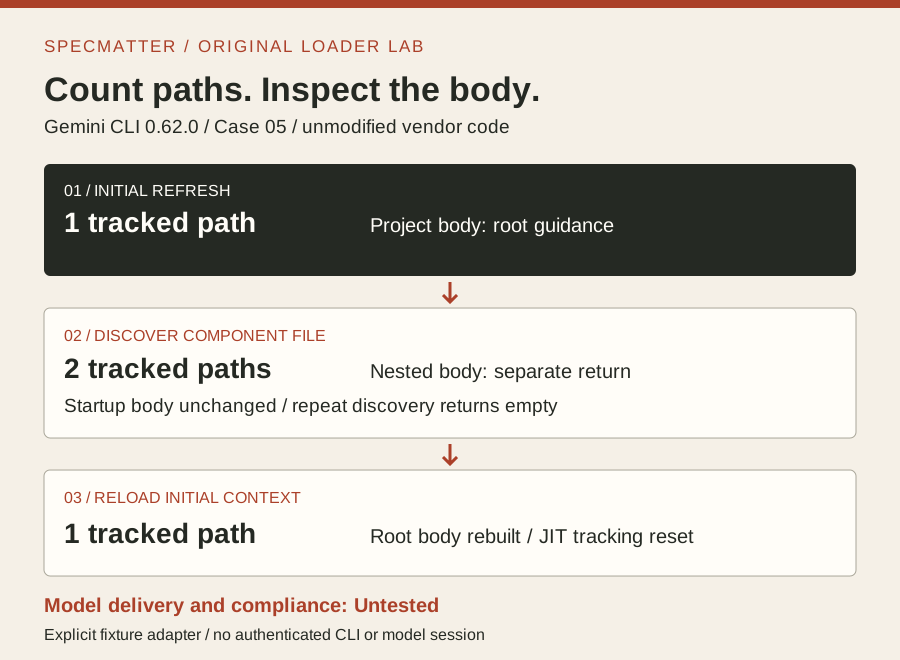
| 05 Nested JIT | Root + components file; discover demo.txt | 1 → 2 tracked paths; separate nested return; repeated call empty; reload returns to 1 | No live tool-to-model injection observed |
| 06 Relative import | @./guide.md | Imported sentinel present; 1 tracked root path | File count is not import count |
| 07 Missing import | Import absent sibling | Exit 0, stderr error, inline failure comment; surrounding text retained | Exit 0 does not mean every import worked |
| 08 Custom names | Three names supplied to vendor setter | 3 paths; all three bodies loaded | Not settings JSON parsing or winner selection |
| 09 BOM / CRLF | Windows .md plus .md.txt sibling | 1 path; correct sentinel retained; wrong extension absent | Not all encodings |
| 10 Whitespace file | Only spaces, tab and newlines | 1 tracked path; memory empty | A file badge is not instruction content |
| 11 Edit + reload | Edit fixture after initial refresh | Cached old sentinel before reload; new sentinel after reload | Not an interactive hot-reload guarantee |
| 12 Untrusted adapter | Explicit false trust flag | Global file loaded; project sentinel absent | Not the product's approval UI |
All twelve workers returned exit zero. The version and help invocations also returned zero. We parsed the final case-tagged JSON line without deleting the vendor's debug logs from the full capture. An earlier collector incorrectly tried to parse the entire logged stdout as one JSON document; that collector error was repaired before these records were extracted.
A larger file count can still show the same text
Case 05 loaded the root file first. Calling the vendor discovery method for components/demo.txt returned the component guidance and added its path to the tracked set. The project-memory getter still held only the root body. The show helper consequently advertised two files while displaying the original root text.
A second discovery call for that path returned an empty string. Reload then cleared the nested path from this manager's tracked set and rebuilt the one-file initial context. These are three different observations: a path was tracked, a body was returned to a caller, and the cached startup body remained unchanged. Do not collapse them into “all instructions are now in memory.”
Case 05, exact returned reload message:
Memory reloaded successfully. Loaded 269 characters from 1 file(s)

Case 10, exact returned show message:
Memory is currently empty.
The 269 is this capture's returned character count, including context wrappers and temporary paths. It is not a token count or a portable measurement of the instruction itself. Another temporary directory can change it. The downloaded result preserves the full path and text so the count remains auditable.
Case 10 offers an even smaller diagnostic: a whitespace-only file was tracked, and the list helper reported one file, but show returned empty memory. If a loaded-file badge looks reassuring, verify that the actual body contains your sentinel before investigating model behavior.
Exit zero did not mean the import succeeded
Case 06 expanded the sibling's text between import comments inside the root body. It still tracked one root context path. The imported file contributed content without becoming a second top-level path in this result.
Case 07 had no sibling to import. The worker still returned exit zero, but stderr recorded an import error, and the project body contained an Import failed comment with ENOENT. Both surrounding sentinels remained. A check based only on exit status would have missed the incomplete context.
Our diagnostic sequence is to retain stderr, locate each expected imported sentinel in the returned body, and distinguish a failure comment from successful imported text. Keep the original fixture and the output rather than reconstructing a “clean” success record. We have not tested recursive imports, cycles, symlinks, or cross-root imports.
Reload evidence, not automatic-edit assumptions
Case 11 wrote a new body only after the manager's first refresh. Before another refresh, its getter still contained INITIAL_GUIDANCE. Calling the actual refresh helper replaced that body with EDITED_GUIDANCE. The before/after file hashes changed only for this deliberate edit; the other starting fixture files retained their hashes.
The context guide calls the command /memory reload, while the commands reference still uses refresh. Source inspection of the installed 0.62.0 command registration found reload with refresh as an alias. That registration was inspected, not typed in an authenticated interactive session. The measured operation here was the vendor refresh helper called by our worker.
Case 08 similarly called the vendor's filename setter with three names; it did not exercise the application's settings parser. All three bodies loaded, but no conflict was presented to a model. Case 12 supplied the trust flag directly; it did not bypass or complete a trust prompt. Keep those narrow results narrow.
Replay the loader without touching your project
The downloadable script creates new temporary homes and repositories, embeds all twelve fixtures, and saves complete command envelopes, returned memory, fixture definitions and version hashes. It accepts an existing official 0.62.0 installation and refuses a different package version. It does not install software or ask for credentials.
Read the adapter before running it. Compare loaded paths with body sentinels, stderr with exit status, and the edited case's hashes with the unchanged fixtures. CSV is a derived view; the JSONL capture is the original process record. Temporary paths and timings will differ across runs.
Authenticated CLI startup, interactive slash-command execution, trust-dialog behavior, extension guidance, model attachment, instruction conflict resolution and generated answers remain Untested. We report no token or cost totals because this experiment did not return those counters. This is a context-service test, not an agent-quality benchmark.
FAQ: what does the evidence settle?
Why does one loaded file show empty memory?
Our whitespace fixture was tracked but contributed no nonempty body. Check the returned text, not only the path count. This result does not diagnose every reason a live session could show empty context.
Are nested instructions loaded at startup?
Our root fixture did not initially include the nested file. Explicit on-demand discovery returned it separately. Live tool delivery to a model was not run and remains Untested.
Does an imported file increase the file count?
Not in our relative-import case: the sibling body was present, while the tracked context set contained only the root. Counts alone cannot establish that imports succeeded.
Will editing GEMINI.md immediately change the cached body?
It did not in our programmatic manager test. The old sentinel remained until refresh, then the new sentinel appeared. Interactive automatic reload was not tested.
Does this prove Gemini obeyed the file?
No. It proves specific results from the official loader under explicit fixture settings. No model client or authenticated session was initialized. Compliance remains Untested.
Sources and limits
- Official context guide: locations, imports, names and memory commands.
- Official command reference: memory operations and naming.
- Official memory-discovery source: implementation reference; our installed bundle and its hashes pin the actual experiment.