Copilot / instruction discovery
Copilot instructions: files, scope, and discovery
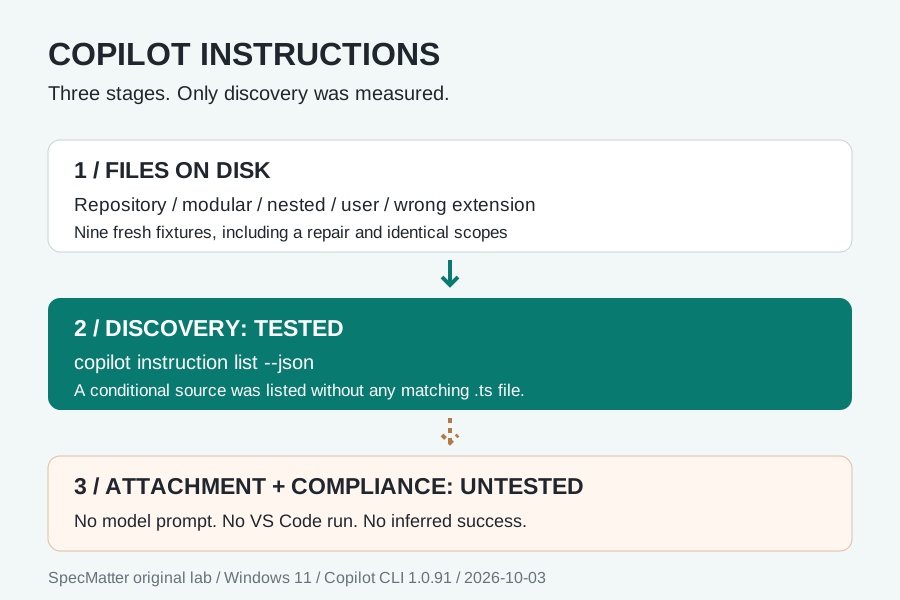
.github/copilot-instructions.md. Use .github/instructions/*.instructions.md with applyTo for file-specific guidance. Check discovery in the client you actually use: our Copilot CLI test listed a TypeScript rule even with no matching source file. Being listed does not prove that a rule was applied or followed.We ran a discovery command, not a model task. VS Code chat, inline completions, request attachment, and compliance with instructions remain Untested.
Start with the intended client
Copilot custom instructions are persistent project guidance, not a replacement for every task prompt. The GitHub CLI guide documents repository-wide, modular and user-level files. In the CLI, user files live under the Copilot home directory; COPILOT_HOME can relocate it. Applicable guidance is combined, so remove contradictions rather than assuming a universal file precedence.
The VS Code guide distinguishes the selected agent harness from its Local agent. A CLI observation is not a VS Code observation. That guide also excludes inline suggestions from custom-instruction behavior. Verify the selected client and session before copying a troubleshooting result between them.
# .github/copilot-instructions.md
Keep changes confined to the requested feature.
Record which validation command ran and its result.
Do not claim a test passed when it was not executed.
These three lines are our example, not a vendor template. Scope-specific guidance should describe a checkable action. Avoid credentials and private customer data in shared instruction files.
Nine actual discovery captures
Each fixture had a fresh Git repository and its own Copilot home. We removed token, API-key, secret and additional-instruction-directory environment variables from the child process. The only tested Copilot operation was instruction list --json; stdin was closed. We did not sign in, submit a prompt, enable a paid plan, or ask a model to generate anything.
| Case | File change | Actual listing | What it proves |
|---|---|---|---|
| 01 Empty | No instruction files | [], exit 0 | Control discovered zero sources |
| 02 Repository | .github/copilot-instructions.md | 1 source; repo-copilot, type repo | Exact repository filename discovered |
| 03 Path-specific | typescript.instructions.md | 1 source; type vscode; applyTo: ["src/**/*.ts"] | Pattern retained in discovery metadata |
| 04 Nested module | Same modular file under instructions/team/ | 1 source; nested sourcePath | This CLI found the nested file |
| 05 User | copilot-instructions.md in isolated home | 1 source; home-copilot, location user | Relocated user source discovered |
| 06 Wrong extension | Modular text stored as typescript.txt | [], exit 0 | Text presence alone was insufficient |
| 07 Repair | Identical text with .instructions.md ending | 1 source; pattern retained | Fresh-fixture filename repair restored discovery |
| 08 Identical scopes | Byte-identical user and repository text | 2 sources: home-copilot and repo-copilot | Source listing is not a deduplicated request |
| 09 No matching file | TypeScript rule plus README; no TypeScript file | 1 source; applyTo: ["src/**/*.ts"] | Discovery did not require a matching task file |
Every process returned exit zero with empty stderr. Counts above come from the length of each actual JSON array, not from counting fixture files. We did not receive token or billing counters from this command and do not turn their absence into a measured dollar amount.
Three boundaries the outputs make visible
Discovery is broader than a matching request
Cases 03 and 09 both listed the same TypeScript pattern. The latter repository contained no matching TypeScript file at all. A listing therefore cannot answer whether the rule was attached to a particular request. Our experiment ends before that step. To test attachment, retain the task, the affected filename, the client session and its instruction evidence separately.
"type": "vscode",
"sourcePath": ".github\\instructions\\typescript.instructions.md",
"defaultDisabled": false,
"applyTo": ["src/**/*.ts"]
This is an exact field excerpt from the CLI's output. The vscode value is its source-type label; no VS Code process executed this test. Likewise, defaultDisabled: false is a discovery field, not proof that the model read the file.
Two source entries do not establish two copies in the prompt
Case 08 returned the user entry and repository entry even though their contents were byte-identical. We counted sources, not prompt copies. The documented instruction-combination behavior and this source listing describe different stages. Prompt deduplication, the order of instructions and the winner of a conflict remain untested here.
A repair needs its own evidence
Cases 06 and 07 contain the same frontmatter and body; only the filename ending differs. The first produced an empty array, the second one source. They ran in separate fresh repositories. This supports a filename diagnosis for these fixtures, not a claim about hot reload, all possible filenames, or another client's settings. Keep the failed record rather than replacing it with the repaired result.
Replay the fixture, not our assertion
The downloadable script embeds all nine fixtures, creates disposable local Git repositories and saves exact stdout and stderr. It invokes the official installed CLI through Node. It neither installs software nor performs login. Supply an absolute path to your own installed @github/copilot/npm-loader.js. Without an output argument it creates a fresh system temporary directory and prints its location.
Replay script Fixture contents
node copilot-instructions-replay.mjs C:\path\to\node_modules\@github\copilot\npm-loader.js

# The actual command inside each isolated fixture:
copilot instruction list --json
The JSONL file is an envelope per run, including arguments, fixture contents, timestamps, exit status and complete stdout/stderr strings. The original source paths remain in the captures. It is not a reconstructed example or a simulated loader. CSV is only the summary; the JSON output is the primary observation. Compare your version capture before interpreting a difference.
We tested discovery only on CLI 1.0.91. Authentication, instruction attachment, model compliance, managed/organization instructions and conflicts during actual generation remain Untested. The CLI reference also notes limitations for plugin-contributed sources in this listing. Our fixtures contain no plugins; they do not prove that this command describes every instruction in every live session.
FAQ: which fact are you checking?
Can a discovery check run without signing in?
Our nine CLI 1.0.91 discovery calls did. Each returned JSON and exit zero without a login or prompt. That is not a free-model-access claim and does not establish how a different client handles authentication.
Why is the file present but missing from the list?
In our wrong-extension fixture, valid-looking content in a .txt file was not listed. Saving identical text with the .instructions.md ending in a fresh fixture yielded one source. First compare filename, directory, client version and the raw listing rather than blaming the instruction's wording.
Does an applyTo pattern prove a rule matched?
No. Our no-matching-file fixture still listed the pattern. The capture proves discovery of a conditional source, not attachment to a task. A request-level test needs its own evidence and is Untested here.
Did this test run Copilot inside VS Code?
No. The CLI emitted a source type named vscode. That label is not an application-launch record. VS Code session settings, references and generated output must be checked in that client; they remain Untested in this lab.
Should AGENTS.md become a second page for this issue?
No. This page owns the Copilot client discovery question. The existing AGENTS.md field note addresses the shared file format. Link between the two intents instead of making another page for a filename synonym.
Sources and limits
- GitHub CLI instructions: supported locations and conditional guidance.
- GitHub CLI command reference: instruction listing and its limitations.
- VS Code instructions: client-specific discovery and verification.