Claude Code / plugin loading field notes
Claude Code Plugins: install, validate, and load one safely
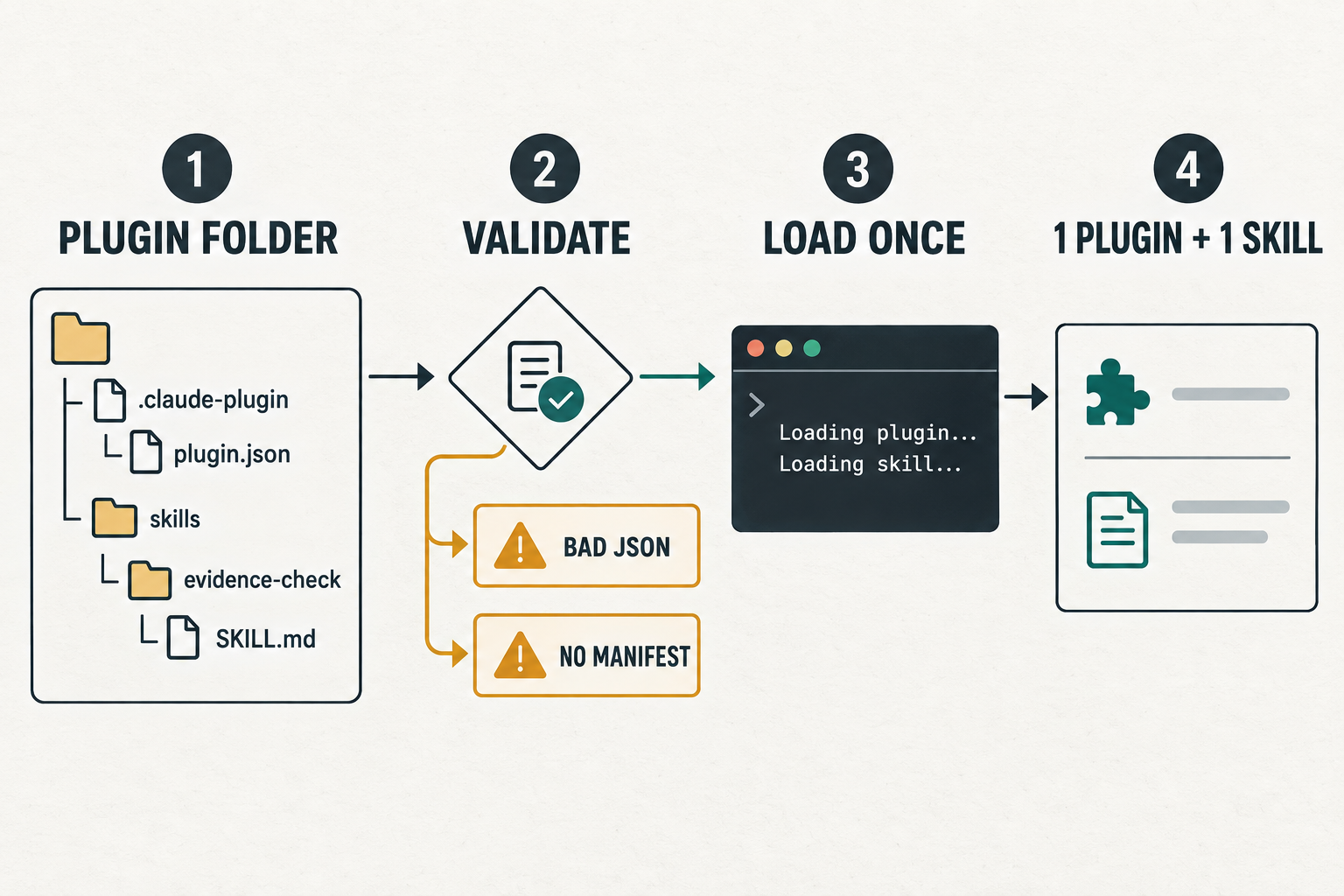
.claude-plugin/plugin.json. Install a shared plugin from a marketplace when you want updates and a persistent scope; use --plugin-dir when you are testing a local copy for one session. Validate the directory first, then inspect what it adds before enabling it broadly.On this Windows machine, Claude Code 2.1.283 accepted a minimal local plugin, rejected broken JSON, rejected a directory with no manifest, and loaded one skill from the valid fixture with --plugin-dir. The test made no model request and installed nothing persistently.
What a plugin changes
| Component | What the plugin can add | What to review |
|---|---|---|
| Skill | Instructions that load when relevant or run as a namespaced command | Name, description, trigger breadth, and full instructions |
| Subagent | A delegated role with its own prompt and tool policy | Allowed tools, model choice, and write authority |
| Hook | A handler that runs on lifecycle events | Event, matcher, executable, arguments, and failure behavior |
| MCP server | External tools and data connections available to sessions | Process, network access, credentials, and tool descriptions |
| Command | A repeatable workflow exposed under the plugin namespace | Arguments, side effects, and files it may change |
The practical difference from a standalone component is packaging. A single local skill can live on its own. A plugin becomes useful when several related components should travel together, share a release, or be installed consistently across projects.
The three installation scopes
| Scope | Where it applies | Settings record | Use it when |
|---|---|---|---|
| User | Every project for one user on this machine | ~/.claude/settings.json | You personally use the plugin everywhere |
| Project | Everyone working in one repository | .claude/settings.json | The repository depends on a shared workflow |
| Local | One user in one repository | .claude/settings.local.json | You are evaluating it without changing team settings |
| One session | Only the current launch | No persistent install | You are developing or auditing a local copy |
claude plugin install <plugin>@<marketplace> --scope local
claude --plugin-dir .\path\to\plugin
The first command installs and records a scope. The second loads a path for one launch. That distinction matters when you are testing an unknown manifest or iterating on a plugin you own.
A local validation test with three fixtures
The valid fixture contained one manifest and one skill:
valid/
├── .claude-plugin/
│   └── plugin.json
└── skills/
    └── evidence-check/
        └── SKILL.md
The same Claude Code binary checked that fixture, a manifest with broken JSON, and a directory with no manifest:
claude plugin validate .\valid --json
claude plugin validate .\invalid-json --json
claude plugin validate .\missing-manifest --json| Fixture | Exit | Observed result | What it proves |
|---|---|---|---|
| Minimal valid plugin | 0 | success: true; warning that author metadata was absent | The manifest parsed and passed non-strict validation |
| Broken JSON | 1 | Invalid JSON syntax: JSON Parse error: Expected '}' | Manifest parsing stops before component discovery |
| No manifest | 1 | Expected .claude-plugin/marketplace.json or .claude-plugin/plugin.json | A plain directory is not accepted as this plugin fixture |
What one-session loading actually showed
claude --init-only \
  --plugin-dir .\valid \
  --debug-file .\plugin-load-debug.log
The process exited 0. Its debug log recorded these checkpoints:
--plugin-dir ...\valid is one plugin
Loaded inline plugin from path: specmatter-plugin-lab
Loaded 1 directory-loaded plugins
Loaded 1 skills from plugin specmatter-plugin-lab default directory
Total plugin skills loaded: 1A short audit before installation
- Read
.claude-plugin/plugin.jsonand identify every declared component and dependency. - Open hooks and MCP configuration before running the plugin. Those components can start processes or connect to external systems.
- Run
claude plugin validate <path> --strictwhen warnings should fail a CI check. - Use
--plugin-dirfor a local copy and save the debug log when you need proof of discovery. - Choose the narrowest persistent scope that matches the actual audience.
- After installation, use
claude plugin details <name>to inspect component inventory and projected context cost.
An enabled plugin can contribute names and descriptions to every turn, run hooks at lifecycle events, and start plugin MCP servers. The review should cover both visible commands and background behavior.
FAQ
Does a Claude Code plugin require a marketplace?
No. A marketplace is the normal distribution catalog, but a local plugin can be loaded for one session with --plugin-dir.
Is a plugin the same thing as an MCP server?
No. An MCP server is one possible plugin component. A plugin can package MCP together with skills, agents, hooks, or commands.
Did this test install or run a third-party plugin?
No. It used a small local fixture written for this test. Nothing was installed persistently, and no model request was sent.
Was plugin invocation tested?
No. Discovery was tested. Invocation remains untested because there was no authenticated model session.