Claude Code / command discovery
Claude Code slash commands: files, names, and what was found
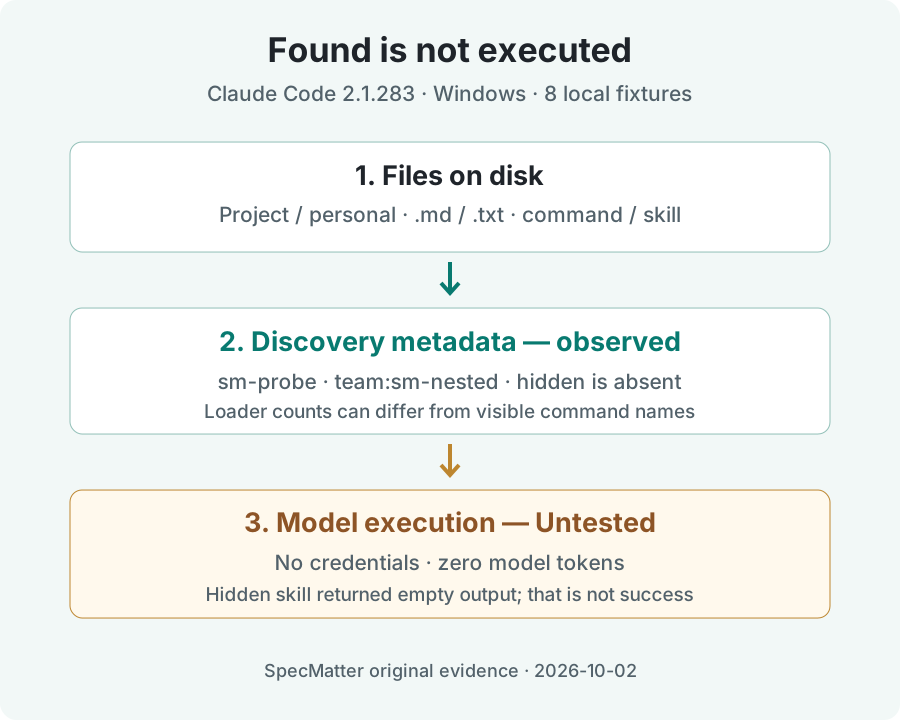
.claude/skills/name/SKILL.md; legacy .claude/commands/name.md files still work. Before diagnosing an unsuccessful answer, check the discovered name and visibility: a file existing, a command being listed, and a model executing it are three different facts.Our Windows test found a flat project command, a personal command, and a nested command with a namespace. It also captured a hidden skill returning an empty result with exit code zero. That did not prove execution. All model-backed outcomes remain Untested.
Choose session control or your own command
/help, /clear, and /compact are session controls. A custom command is your own reusable prompt. It is not a shell alias: type it inside Claude Code, rather than asking PowerShell to execute a slash-prefixed filename. The official command reference distinguishes built-in commands from skills.
Keep a harmless discovery check separate from a command that deploys, deletes, or changes a repository. The fixture below only asks for a marker and explicitly forbids tool calls. Its body was not executed by a model in our run.
# .claude/commands/sm-probe.md
---
description: Harmless SpecMatter command discovery fixture
---
Return SPECMATTER_DISCOVERY_ONLY.
Do not call tools or edit files.
The official skills documentation describes the newer SKILL.md format and backward compatibility. This page tests the command surface; our separate skills field note covers triggering and loading failures.
Eight fixtures, one unchanged CLI
Each case had its own disposable project and user configuration directory. We checked auth status --json first and continued only when loggedIn was false. The same print-mode command then emitted discovery metadata and a result. Credentials were removed from the child process environment; no subscription or API key was added.
| Fixture | File or change | Observed name / loader count | Process result |
|---|---|---|---|
| 01 Empty control | No custom files | No sm- names; loader 0 | Exit 1, authentication failure |
| 02 Project Markdown | .claude/commands/sm-probe.md | sm-probe; loader 1 legacy command | Exit 1, authentication failure |
| 03 Nested Markdown | .claude/commands/team/sm-nested.md | team:sm-nested; loader 1 legacy command | Exit 1; attempted /sm-nested, not the qualified name |
| 04 Personal Markdown | commands/sm-personal.md in isolated user directory | sm-personal; loader 1 legacy command | Exit 1, authentication failure |
| 05 Same-name files | Legacy command + SKILL.md named sm-shared | sm-shared in both metadata lists; loader 2 | Exit 1; winning body not observed |
| 06 Hidden skill | user-invocable: false | No sm-hidden in advertised lists; loader 1 project skill | Exit 0; empty result, 0 turns |
| 07 Wrong extension | .claude/commands/sm-probe.txt | No sm-probe; loader 0 | Exit 1, authentication failure |
| 08 Extension repair | Same text stored as sm-probe.md in a fresh fixture | sm-probe; loader 1 legacy command | Exit 1, authentication failure |
All eight final result records reported zero input tokens, zero output tokens, and zero dollars. Seven stopped with Not logged in · Please run /login; the hidden-skill case returned an empty local result instead. Neither result establishes that a model followed the fixture instructions.
Observation CSV Discovery field extracts Original result lines
Three observations that prevent a false diagnosis
A nested file was found under a qualified name
The nested fixture was not missing. Its initialization record advertised team:sm-nested. Our attempted input was the shorter /sm-nested, and authentication then stopped the run. This measures the advertised name, not whether both spellings can invoke the command. The latter remains untested. Copy the reported identifier when investigating a discovery problem; do not assume a basename is the complete name.
Two loaded files did not mean two visible command names
The collision fixture loaded one project skill and one legacy command, while the slash-command metadata contained a single sm-shared name. The skill list also contained sm-shared. Loader counts therefore cannot tell you which body was selected. The documentation says a same-name skill takes precedence, but our unauthenticated capture did not independently verify the winning body.
2026-10-02T01:09:38.557Z [DEBUG] Loaded 2 unique skills (2 unconditional, 0 conditional, managed: 0, user: 0, project: 1, additional: 0, legacy commands: 1)Exit zero was not a generated answer
The hidden fixture was counted by the loader but absent from both advertised lists. Its result had local_command: "custom", no turns, and an empty string. A pipeline that checks only the process exit code would call this success while receiving no answer. In this experiment, success needs separate evidence for discovery and for the expected marker; only discovery was tested.
"is_error": false,
"num_turns": 0,
"result": "",
"local_command": "custom",
"total_cost_usd": 0
These are selected original fields, not a complete result object. The downloadable original-result file preserves each full result line, in fixture order 01 through 08. Discovery extracts omit working-directory paths, session identifiers, and unrelated fields; they are labeled projections rather than full stdout. The installed CLI also advertised the built-in agents-md plugin, so this was isolated user/project configuration, not a claim that every built-in component was disabled.
Reproduce without borrowing our conclusion
Download the fixture JSON and replay script into the same folder. Supply the absolute path to an already installed official Claude Code executable. The script creates a new temporary directory, checks authentication, closes stdin, saves stdout, and leaves its files available for inspection. It refuses an authenticated configuration. It neither installs software nor opens a login flow.
node claude-code-slash-commands-replay.mjs C:\path\to\claude.exe 02-project-md
node claude-code-slash-commands-replay.mjs C:\path\to\claude.exe 07-wrong-extension
node claude-code-slash-commands-replay.mjs C:\path\to\claude.exe 08-repaired-extension
The measured CLI invocation used these arguments after the isolated environment was prepared:
claude --print --output-format stream-json --verbose \
  --setting-sources user,project --debug-file debug.log \
  /sm-probe
Record your version before comparing results. Our extension repair used a fresh directory with identical command text and a Markdown filename; it was not a claim about hot reload in an existing session. We did not test interactive autocomplete, successful authentication, argument substitution, permission approval, or a generated marker. If you test those later, retain the new output separately rather than relabeling this capture.
FAQ: found, hidden, or not executed?
Can I check discovery without a paid account?
In our installed 2.1.283 CLI, print-mode initialization exposed names before the authentication failure. That is a measured discovery check, not access to free model execution. The expected marker was never generated.
Why is my Markdown file present but my command missing?
Start by separating disk presence from advertised names. In our fixtures, the .txt file was ignored, the nested file gained a namespace, and the hidden skill was loaded without being advertised. These are three distinct observations, not one generic missing-command failure.
Does a zero exit code prove a slash command worked?
No. The hidden-skill capture returned exit zero with an empty result and zero turns. Check the result content and whether the expected work actually occurred; do not infer a model answer from the process status.
Did the collision test prove which file wins?
No. It proved both files were counted and one command name was advertised. The selected prompt body remains Untested. Keep the documented precedence rule separate from the result this machine actually produced.
Is this the same problem as a skill failing to trigger automatically?
No. This page checks the explicit slash-command surface and its names. Automatic skill selection is a different intent, covered in the linked skills field note. No second page is needed for a filename variation.
Sources and evidence boundaries
- Official command reference — session controls and custom command distinction.
- Official skills reference — legacy compatibility, visibility, and documented precedence.
- Official CLI reference — print mode, structured output, source filtering, and debug options.