OpenSpec commands: what to type in the terminal, and what to type in your agent
The short answer: commands beginning with openspec belong in your terminal.
Workflow commands such as /opsx:propose belong in your AI coding agent's chat. Codex is the
exception in spelling, not in purpose: it uses skills such as $openspec-propose instead of
generated /opsx:* command files.
The default core profile installs six workflows: propose, explore, apply, update, sync and
archive. Verify is real, but it is not in the default profile. Enable it through the profile selector,
run openspec update, then use the spelling your agent supports.
Checked against OpenSpec v1.13.2 and the repository documentation on 2026-09-25. The Windows timings below came from this machine, not from a vendor benchmark.
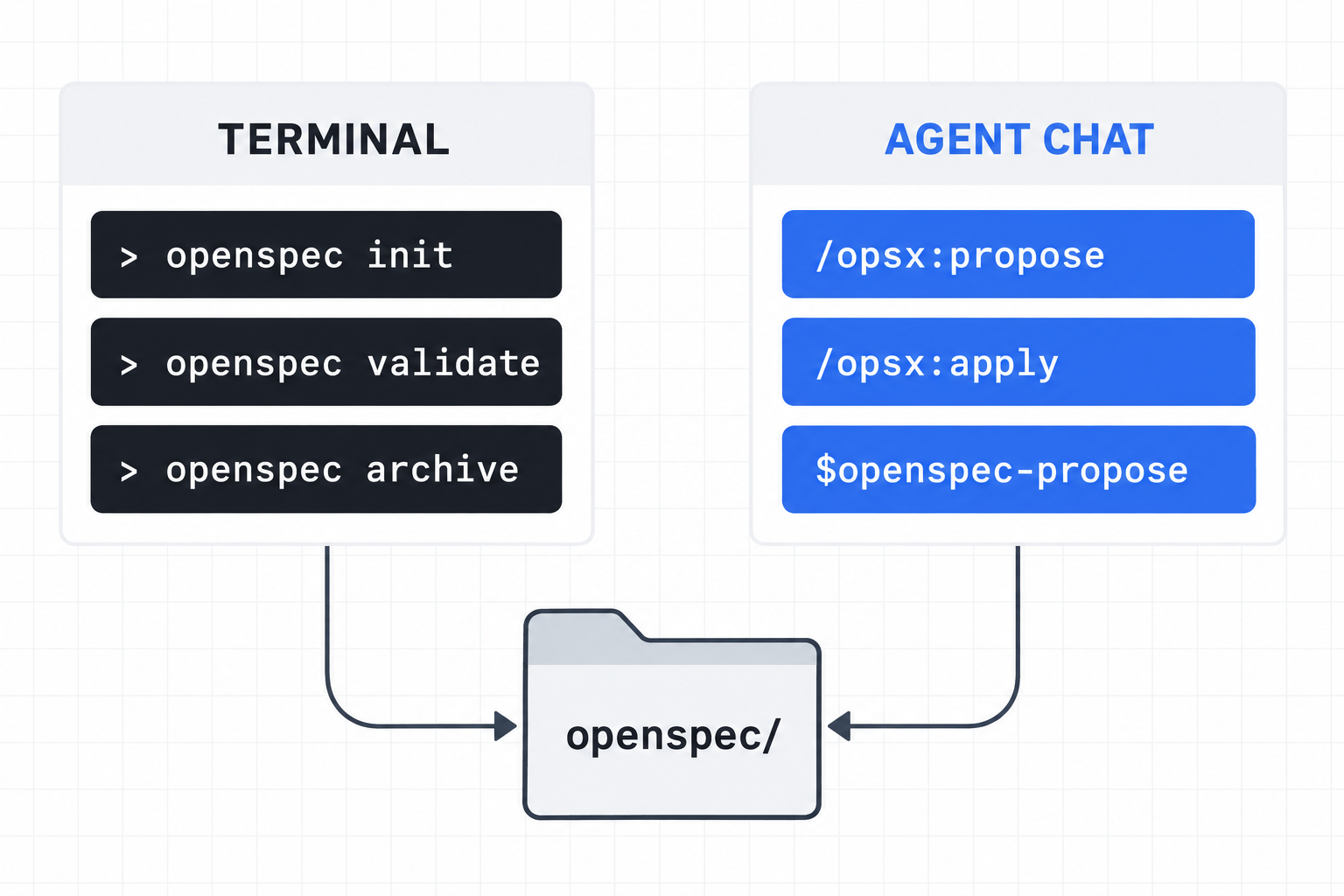
The command split that prevents most first-hour mistakes
| Where | Examples | What that surface does |
|---|---|---|
| Terminal | openspec initopenspec validateopenspec archive | Creates and inspects the file structure, validates artifacts, updates profiles and archives changes. |
| Agent chat | /opsx:propose/opsx:apply$openspec-propose in Codex | Reads the project, writes planning artifacts, implements tasks and checks the result against the plan. |
Do not paste /opsx:propose into PowerShell. It is not an executable. And do
not paste openspec validate into an agent chat expecting the agent UI to register a workflow.
The same project needs both surfaces, but they are not interchangeable.
The OpenSpec CLI commands you actually need
This is the smallest useful set. The CLI has more subcommands, but these cover setup, inspection, validation, templates and completion.
| Command | Use it for | Important detail |
|---|---|---|
openspec init --tools codex | Create the OpenSpec tree and Codex skills. | Codex is skills-only. No Codex command files are generated. |
openspec update | Refresh generated skills and commands after an upgrade or profile change. | Restart the agent if it only scans skills at startup. |
openspec list | List active changes. | Add --specs to list main specifications instead. |
openspec status --change NAME | See which artifacts are complete, ready or blocked. | Proposal unlocks specs and design; both unlock tasks. |
openspec validate NAME --strict | Check one change for structural errors. | Use --all for every change and spec. |
openspec templates | Show the resolved template paths for the current schema. | This is the direct answer to “where is the OpenSpec template?” |
openspec instructions ARTIFACT --change NAME --json | Get the template plus dependency-aware instructions for one artifact. | Useful when an agent command is unavailable but the CLI still works. |
openspec archive NAME --yes | Sync deltas and move a finished change to the dated archive. | --yes prevents a non-interactive run from stalling on prompts. |
OpenSpec commands change spelling by agent
The intent stays the same. The generated file shape determines the invocation.
| Tool family | Propose example | Why |
|---|---|---|
Claude Code, Gemini CLI and tools with an opsx/ command folder | /opsx:propose | The folder creates the namespace. |
| Cursor, GitHub Copilot IDE, Trae and most filename-based adapters | /opsx-propose | The command name comes from one flat filename. |
| Amazon Q Developer | @opsx-propose | It loads the generated file into a prompt library. |
| Codex CLI, IDE and desktop | $openspec-propose | Codex receives skills under .agents/skills/, not command files. In the desktop app you can also select the skill from the sidebar. |
| Kimi Code | /skill:openspec-propose | Its skill surface uses the /skill: prefix. |
What v1.13.2 did on this Windows 11 machine
Reproduced on 2026-09-25 with Node v24.19.0, npm 11.17.0 and a clean local install of
@fission-ai/[email protected]. The lab was isolated from the production site.
| Step | Measured result | Elapsed |
|---|---|---|
init --tools codex --profile core | Exit 0. Six Codex skills created under .agents/skills/; 10 files total; command files explicitly skipped. | 1,619 ms |
validate windows-archive-check --strict --no-interactive | Exit 0. One proposal, delta spec, design and completed task file accepted. | 1,253 ms |
archive windows-archive-check --yes | Exit 0. One requirement added, change renamed to 2026-09-25-windows-archive-check, no active changes left. | 1,312 ms |
| Post-archive lock check | Zero files named .openspec-archive.lock. | 0 locks |
The v1.13.2 release notes specifically say archive no longer leaves that lock behind when Windows blocks a directory rename. This run reached the fixed path successfully. It proves the behavior on this machine; it does not prove every Windows filesystem, sync client or antivirus combination will behave identically.
Where verify fits, and why it may look missing
/opsx:verify checks completeness, correctness and coherence between the implementation and
the change artifacts. It is not the same as openspec validate: validate checks artifact structure;
verify asks the agent to look for implementation evidence.
The default core profile does not install verify. It installs propose, explore, apply, update, sync and
archive. Use openspec config profile to select expanded workflows, then run
openspec update. On Codex, the expanded workflow appears as the
openspec-verify-change skill.
Current-version detail: v1.13.2 changed verify so skipped checks are not reported as passes, and removed requirements are judged by whether the old behavior is gone. That makes an old screenshot of a green verify report weaker evidence than a current run with the version recorded.
A practical OpenSpec command sequence
# Terminal: set the project up once
openspec init --tools codex --profile core --no-animation

# Agent chat: plan and implement
$openspec-propose "add a health endpoint"
$openspec-apply-change

# Terminal: inspect and validate
openspec status --change add-health-endpoint
openspec validate add-health-endpoint --strict

# Agent chat: verify if the expanded skill is installed
$openspec-verify-change

# Terminal or archive skill: finish the change
openspec archive add-health-endpoint --yes
For Cursor, replace the Codex skill spellings with /opsx-propose,
/opsx-apply and /opsx-verify. For Claude Code or Gemini CLI, use the colon form:
/opsx:propose, /opsx:apply and /opsx:verify.
Five failures that look like command bugs but are not
openspec: command not found: the global npm prefix is not on PATH. On Windows, the executable sits directly in that prefix.- The workflow command does not autocomplete: the agent may need a restart, or your tool may use skills rather than command files.
- Verify is absent: the core profile does not include it. Select it, then update.
- “Change not found”: name the change and confirm you are in the project root.
- Archive fails in an agent or CI shell: pass the change name and
--yesso no prompt waits for unavailable input.
FAQ
Is OpenSpec CLI the same thing as the agent commands?
No. The CLI manages OpenSpec files and validation. The agent workflows interpret those files and do the planning or implementation work.
What is the OpenSpec Codex command?
Codex uses generated skills. The propose skill is $openspec-propose in Codex CLI or IDE; in
the Codex desktop app, select openspec-propose from the Skills sidebar.
Where is the OpenSpec template?
Run openspec templates to show the resolved template paths. Run
openspec instructions <artifact> --change <name> --json to get the template plus the rules
and dependencies for that artifact.
Does OpenSpec verify block archive?
No. Verify reports implementation issues, but the command reference says it does not block archive. Treat its warnings as review work, not as a structural validator.
Why should I record the OpenSpec version?
Command behavior changes. v1.13.2 changed verify reporting, Windows archive handling and CRLF preservation, so a result without a version can be impossible to interpret later.